Email communication plays a vital role in personal and professional platforms. And it’ll continue to serve as a key pillar in both areas of private and business communication. To extract emails from mbox files, fulfill the needs of data analysis, market audits, legal compliance and migration. If you are searching an article on ‘how to extract emails from MBOX Files?’, then this article provides you details in depth, which covers both manual and automated methods, advanced softwares, and proven practices. This article is also in detail about the limitations and features of it.
What Is The Intent to Extract Emails from MBOX Files?
The objective behind extracting emails from an mbox file is to select the best and proven method for the requirement and fulfill the need of the job. There are several objective, are:
- To build a contact list from an mbox message archiver.
- Fulfill the need of the user to store a single email in a separate file.
- Some users extract emails to store them for a long term.
- To take backup of some important emails.
- Filtering spams of older emails.
- Users can access export emails without any hustle and bustle.
- Sometimes users extract emails for migrating emails from email data between platforms.
Multiple Methods to Extract Emails From MBOX File
As we all are aware of ‘what is MBOX files’ now the question comes after that is ‘how to extract emails from MBOX File?’ and the answer is, there are two tested methods which help to extract emails from mbox file. They are Manual Vs Automated.
Method 1: Manual Method
To use this method, users can use email clients like Mozilla Thunderbird + Add-on tool ImportExportTool NG.
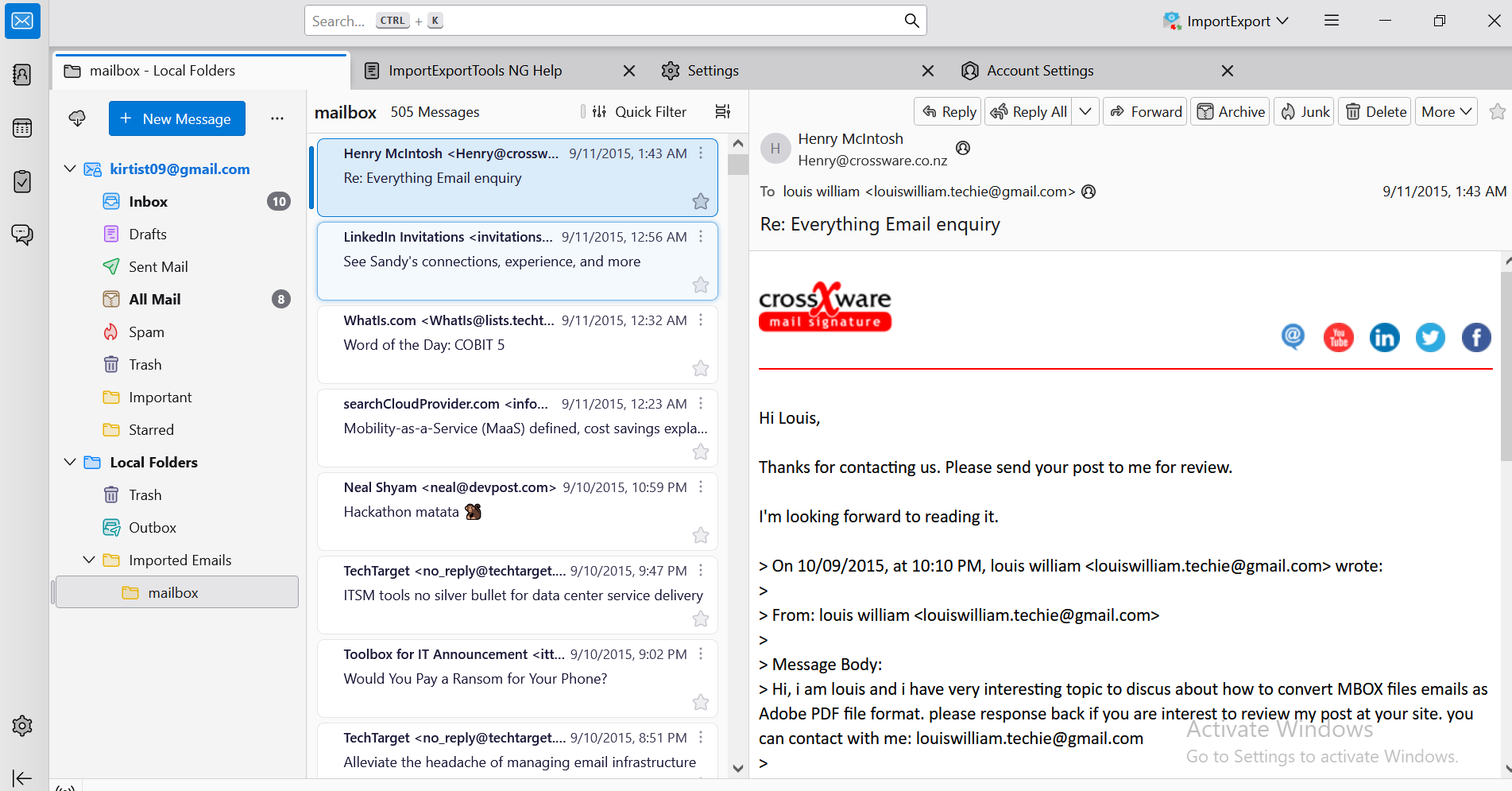
Step-by-step Guidance of Manual Method:
Step 1: Open the Thunderbird on your pc.
Step 2: Add the ImportExportTool NG add-ons in Thunderbird.
Step 3: By using add-on, import the files to Thunderbird through see and select import mailboxes under ‘local folders’.
Step 4: Then, select email, right click on that selected email, and tap on ‘save as’.
Step 5: Now, select the destination location to save the file and tap the ‘save’ button.
Step 6: After that, the user can see the extracted file in the destined location into the ‘.eml extension’.
This process has some limitations as well. As they discussed:
- Thunderbird installation is necessary to extract the mbox file into a single email message.
- It’s a time-consuming process to extract large mbox files.
- It also needs time to install thunderbird, email configuration and add-on setup.
- There’s a high chance of missing emails.
Method 2: Automated Method
Expertised method to extract emails in bulk by using BitRecover MBOX Extractor. It’s a popular and widely used tool to export MBOX Data in one go. This email extractor comes with many advanced features, which makes work easier. This Utility is compatible with window 11, 10, 8.

Steps of extract emails from MBOX Files Using MBOX Extractor Tool
- Firstly, complete the installation process of the email extractor from the above mentioned link, and click on the ‘open’ button.
- This tool provides a dual option of selecting the MBOX folder as well as file, Choose according to your requirement.
- Select the folder or file from MBOX and tap the ‘ok’ button.
- Then, click the selection folder destination and click the ‘ok’ button.
- Watch mailboxes in the software panel and select the MBOX file and save it.
- Now, for the saving path choose the ‘Folder’ icon.
- Also, choose the destination path and click on the ‘ok’ button.
- On the basis of different criteria use the filter option to ‘extract emails’ and then select the destination path and hit the ‘ok’ button.
- Now, extract the emails from the MBOX file, and wait for a while.
- After the completion of the process, go to the destined path to get extracted emails.
Features of Email Extractor MBOX Tool
There are multiple features of Email Extractor MBOX Tool:
- It’s an ‘Independent Application’, doesn’t require the installation of any supported email client for extracting emails from MBOX files.
- This provides the facility of ‘Preview Mails’ after selecting the file for extraction in the software panel.
- This software is fully consistent with ‘Large-size’ files, as there are no issues in extracting emails from MBOX files in bulk.
- That tool supports exported MBOX files from multiple email clients like Thunderbird, GoogleTakeout, SeaMonkey, Apple Mail, Edura Mail etc,.
- This advanced version of email extractor tool is stuffed with ‘Multiple Email Filtration’ options which includes facility to extract emails from MBOX files by specific email address, selection of date-to-date email extraction, and email size as well.
- It gives the functionality that permits it to extract messages from MBOX. It is developed for extracting emails from MBOX files for completing multiple professional tasks.
- It gives you accuracy, full control and speed.
Manual Vs Automated Email Extraction from MBOX File
|
Criteria |
Manual Method |
Automated Method |
| Time Accuracy | Slow for large files | Fast and Optimized |
| Ease of Use | Quiet simple | User-friendly |
| Accuracy | Low | High |
| Handle Multipart Emails | No | Yes |
| Batch File Support | No | Yes |
| Export Option | Manual copy-paste | Excel, PST, EML, PDF |
| Error Handling | Manual review needed | Built-in error |
| Cost | Free | Often commercial software, some free options available |
| Technical Skill Needed | No | No |
| Security / Privacy | Depends on user environment | Choose secure otions |
| Field Specific Extraction | No | Yes- extract specific details like From, To, BCC etc,. |
| Pattern Matching | Basic | Advanced filtration method |
Conclusion
This article answered ‘How to Extract Emails From MBOX Files?’ in depth and tried to explain that, this software helps perform professional tasks like data analysis, migration and email management, they all are practical tasks to extract emails from MBOX files. As this article showed the difference between manual method vs automated method. Manual methods can work well with small data export, slow and error-prone, on the other hand automated methods are feature-rich software, user friendly and can export data in bulk.
To protect sensitive content, always go with data privacy laws and use extracted emails from MBOX file responsibly and also smartly with the use of appropriate email extractor tools.